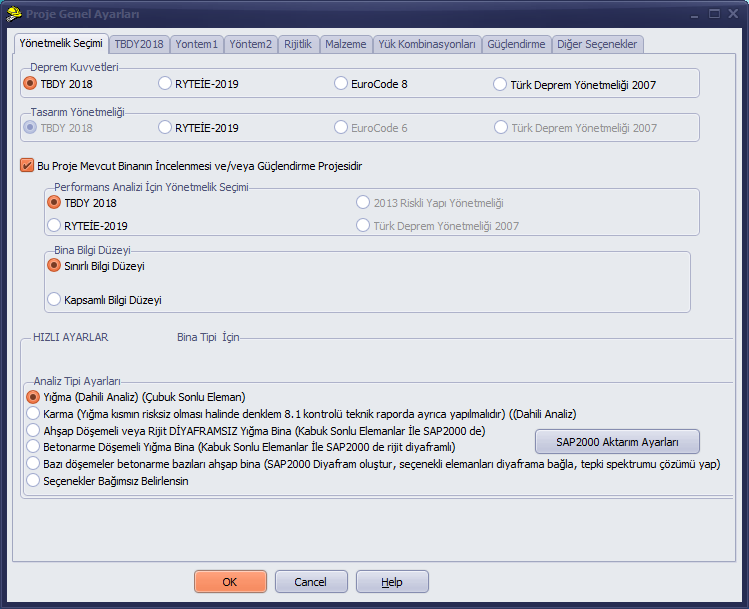
Code Selection Tab
PROJECT GENERAL SETTINGS
1-Code Selection Tab
The program supports masonry building analysis using the following options: TBDY2018 (2018 Turkish Building Earthquake Code), RYTEİE2019 (2019 Risky Building Regulation), Eurocode 8/Eurocode 6 (European Standards), and TDY2007 (2007 Earthquake Code).
With each settings option, the options in the other tabs and the content of the pages change accordingly.
If a setting is made that conflicts with RYTEİE 2019, the program attempts to bring the settings into compliance with the conditions stipulated by the regulation during analysis.
For analyses performed under other codes, the changes made by the user are applied during the analysis run. The program is not an engineer; therefore, the conformity of the values entered into the program with the applicable code, and the interpretation of the relevant code articles, must be ensured by the user through reading and understanding those articles. The program attempts to perform the analysis correctly in accordance with the method preferences selected during data entry.
When the code selections are made, the data entry parameters in the other tabs and in the wall properties form are affected. Therefore, it is important to specify the selection at the start of the project. If this has not been done, the parameters can still be corrected later in the relevant forms.
The code to be used for the analysis is selected using the radio buttons in the seismic forces group. In the current version, the design code is automatically selected based on the option chosen under the seismic forces setting.
If the option This project is an inspection and/or retrofit project for an existing building is selected, the program performs a performance analysis depending on the selected options and reports the results. This option must be checked when performing a performance analysis of an existing building or when carrying out a strengthening/retrofit design.
Knowledge level factor is used in accordance with the selected code.