METHOD 1 Tab
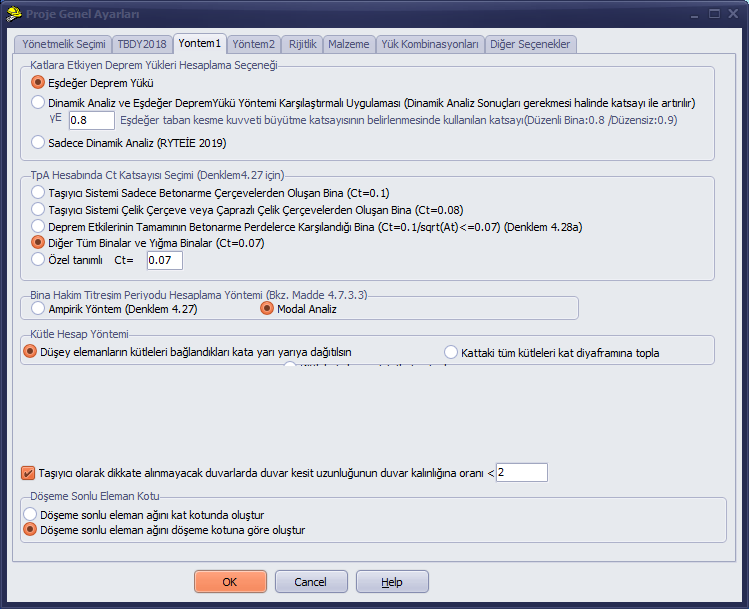
In Analyses According to the 2018 Earthquake Code
In the Earthquake Load Calculation Option Group Acting on Storeys
Equivalent Seismic Load
Or
Comparative Application of Dynamic Analysis and Equivalent Seismic Load Method (Dynamic Analysis results are amplified by a coefficient when required)
can be selected. When Option 2 is selected, seismic forces are calculated approximately 15% less (although this varies by building), and Option 2 is a more advanced analysis method compared to Option 1.
When analysis is performed with Option 2
(a) If at least one of the A1, B2, or B3 type irregularities defined in TBDY2018 Table 3.6 exists in the building, γE = 0.90 shall be taken.
If none of the irregularities defined in Table 3.6 exist in the building, γE = 0.80 shall be taken.
For analyses to be performed within the scope of RYTEİE2019, Option 3 must be selected; if it is not, the program converts the option to Option 3 during analysis.
As the Building Dominant Vibration Period Calculation Method (See Article 4.7.3.3), the Empirical Method (Equation 4.27) or the modal analysis method can be selected. Modal analysis is a method that reaches its value through a more detailed calculation.
Mass Calculation Method:
The option "Distribute the masses of vertical elements to the connected storeys equally (half-half)" is mandatory for RYTEİE2019. No provision has been observed for TBDY2018. In our opinion, this option can yield more reasonable/realistic results.
In the option "Collect all masses at the storey into the storey diaphragm", it is assumed that all masses are concentrated at the centre of mass at the storey ceiling level.
Option 1 calculates seismic forces as lower values.
TBDY2018 Article 11.3.10 – Walls whose cross-section length is less than twice the wall thickness shall not be considered as load-bearing in calculations.
For walls not to be considered as load-bearing, the ratio of wall cross-section length to wall thickness < value option: When this option is selected, in accordance with TBDY2018 Article 11.3.10,
If the Element Shear Force and Moment Calculation Option (Method 2 Tab) Equivalent Frame Model (By Force Method) option is selected, wall stiffness multipliers are set to zero during analysis — that is, no seismic shear force is applied to walls satisfying this condition, and the shear force that would have been distributed to these walls is redistributed to the other walls.
However, if the Finite Element Method (With Frame Elements) option is selected, having this option selected is meaningless. In order to apply the condition of TBDY2018 Article 11.3.10, the modulus of elasticity of walls whose cross-section length is less than twice the wall thickness can be set to 1 MPa by user intervention. The reason why the option cannot be applied in the finite element model is that zero-stiffness elements distort the analysis results.
Slab Finite Element Level Option
These options are valid when the finite element method is selected on the Method 2 page and slabs are included in the system stiffness.
Create slab finite element mesh at storey level: In this option, all slabs are included in the finite element model at storey level regardless of their elevation. It may be preferred for buildings with low slabs where moment continuity needs to be ensured.
Create slab finite element mesh according to slab level: In this option, all slabs are included in the finite element model by considering their left and right elevations and slope directions. It may be preferred in stepped structures where wall top elevations differ. If wall top elevations and slab elevations do not match, errors may occur in the finite element analysis. If a solution error occurs, the program attempts to show the effect of the error as an error percentage in the analysis errors section, and all element forces may come out as zero.