Timber Slab Vibration Check
This article describes how to use the vibration check of timber slabs in StatiCAD. The calculation is carried out according to Clauses 5.4 / 5.4.2 and 4.8.4.7.1 of the Turkish Design, Calculation and Construction Principles for Timber Buildings (ABTHYE, Official Gazette 24.03.2024). For a step-by-step application, see the article Worked Example: Timber Slab Vibration.
Which editions? This feature is available in the StatiCAD Ultimate edition. The check does not change the analysis results; it is carried out in closed form on the slab calculation axis, and the results are written to the analysis warnings, the project checklist and the “Ahşap Döşeme Titreşimi” (Timber Slab Vibration) report page.
1. General workflow
The unit of the check is the calculation axis of the slab. Timber slabs are usually divided into small slab pieces along the joist axes with the command “Create ribs/grid on selected slab”. This operation does not touch the calculation axis; the L × B dimensions of the original span remain in the calculation axis.
- Draw the slab with the rectangular slab tool; the calculation axis is created together with the slab.
- If necessary, right-click > Create ribs/grid on selected slab to divide the slab first along the main joists and then along the blocking (the joists are generated as timber beams).
- Show the calculation axes, right-click the calculation axis and open its properties. In the Timber Slab tab, select Slab type = Timber joist floor. The input source is Model by default: the joist and sheathing values are taken from the elements inside the calculation axis.
- Run the analysis. The vibration check is performed at the end of the analysis.
- See the results in the analysis warnings list, in the project checklist, and in the report tree at the node Ahşap Eleman Raporları > Ahşap Döşeme Titreşimi (ABTHYE 5.4.2 / 4.8.4.7.1) (Timber Element Reports > Timber Slab Vibration).
In the slab (piece) properties window, the Timber Slab tab only shows a guidance text: it gives the name of the calculation axis that contains the slab and where the definition is to be made. Light-gauge steel slabs are not covered by this check.
2. Calculation axis properties > “Timber Slab” tab
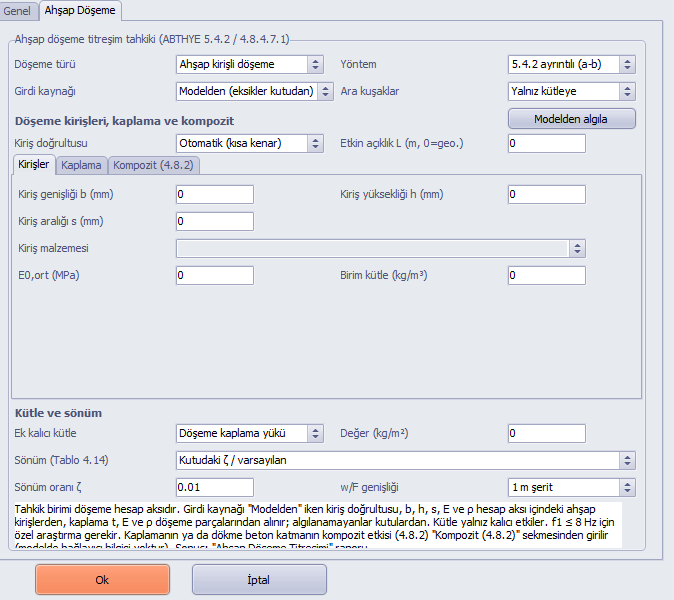
The “Timber Slab” tab of the calculation axis properties window; input source “Model”.
| Field | Description |
|---|---|
| Slab type | None (no check is performed), Timber joist floor or CLT slab (4.8.4.7.1); see Section 6 for CLT inputs. For a timber joist floor, the joist, sheathing and composite inputs are in the inner tabs Joists / Sheathing / Composite (4.8.2); see Section 7 for composite. |
| Method | 5.4.2 detailed (a-b): steps 1-6 of the code (default). 4.8.4.7.1 simple: w/F ≤ 1.5 mm/kN and v ≤ 100(f1·ζ−1). |
| Input source | Model (missing values from boxes): joist direction, b, h, s, E, ρ and sheathing t, E, ρ are detected from the model; for a value that cannot be detected, the value in the box is used (default). Values in boxes only: the calculation is carried out entirely with the entered values. |
| Blocking | Mass only (default): the weight of the blocking is added to the mass but not to the stiffness (safe side). Mass + (EI)B: the stiffness of the interior blocking lines is added to (EI)B as n·EIblocking/span. End blocking lines close to the support (those closer to the edge than half of the spacing to the neighbouring blocking line, or than 15 cm / 5% of the span, whichever is closer; independent of the wall thickness) do not contribute to the stiffness, only to the mass. The option applies only with the Model input source. Blocking with the same section and spacing as the main joists brings (EI)B close to (EI)L (moving away from the orthotropic plate assumption of the grid); if (EI)B ≥ (EI)L, Eq. 5.12 is not valid and the program reports an input error. For blocking whose material cannot be found, the E of the joist is used. |
| Detect from model | Detects the joists and sheathing pieces inside the calculation axis, writes the values found into the boxes and shows a summary at the bottom of the tab. |
| Joist direction | Used if the model cannot determine the direction definitively. Automatic: the joists are assumed to run along the short side. If the model has determined the direction definitively and the direction in the box contradicts it, the model direction is used and a note is added to the report. |
| Effective span L | If 0, the side of the calculation axis parallel to the joists. For continuous slabs, enter the effective joist span. |
| b, h, s, joist material, E0,mean, ρ | Used for slabs that cannot be detected from the model (for example a slab not divided into ribs). Selecting the material fills in E and ρ. |
| Sheathing | The thickness is taken from the slab thickness of the pieces. E and ρ are taken from the material if a library/project material (for example OSB) is assigned to the pieces; if none is assigned, they must be entered in the boxes. The board layout selects the strong-axis or weak-axis E. |
| Additional permanent mass | Slab finish load: the finish G of the pieces (kg/m², area-weighted). User value: the box beside it. Live load is not included. |
| Damping (Table 4.14), ζ | One of the seven rows of Table 4.14 or ζ in box / default. The default is 0.01 for a timber joist floor, 0.03 for a composite joist floor with a cast concrete layer (Table 4.14 row 3), and 0.025 for a CLT slab (Table 4.14: CLT, supported on two sides). The ζ box is disabled while a table row is selected. |
| w/F width | Default is a 1 m strip (L³/(48(EI)L)). With the L/2 option the lower bound is L³/(384(EI)L). For CLT, the 1 m strip (4.200) is fixed. |
3. Detection of inputs from the model
- Joists: elements inside the calculation axis whose type is timber beam. Support beams on the edge and walls are not counted. For a joist that extends outside the calculation axis (one passing over two spans or continuing as a cantilever), only the length inside the axis is counted; the short end of a joist of the neighbouring axis that overhangs the common support is not counted for this axis.
- Direction: the joists are grouped by direction. The direction is definitive if there are at least two full-span joist lines (at least 75% of the span) in one direction and none in the other direction. A single full-span joist (which may be a supporting beam or a continuous blocking line) does not determine the direction. If it is not definitive, the direction in the box, then the dominant direction of the model, then the short side are used in this order, and a note is added to the report.
- Main joist and blocking: in the selected direction, joists with a length of at least 45% of the span are counted as main joists, and those in the perpendicular direction as blocking. If the direction comes from the box or from the short side rather than from the model, a full-span length (75%) is required for a main joist; thus blocking pieces are not counted as main joists. The model grid is used only if there are at least two main joist lines; for a single line, b, h and s are taken from the boxes. If the direction is not definitive and has not been selected in the box, information is given in the analysis warnings: in this case select the direction in the Joist direction box.
- Spacing s: the median of the spacings between the main joist axes and the two opposite edges. If the spacings are not uniform, a note is added.
- Section and material: the width and height of the main joists, and E0,mean and ρ from their material. If the joists differ, the joist with the smallest EI is taken. If the joist material is not timber (for example concrete or steel), E and ρ are not taken from that joist; the value in the box is used, and a note is added to the report and to the analysis warnings.
- Sheathing: slab pieces whose centroid lies inside the calculation axis; the thickness is area-weighted, and for (EI)B the smallest one is used if the thicknesses differ.
- Mass: weight of all timber joists inside the calculation axis (main joists + blocking) / area + sheathing ρ·t + additional permanent mass. For joists whose unit mass cannot be found, the volume is multiplied by the joist ρ box.
- Notes: the selections made during detection (smallest EI, median spacing, direction, excluded joists) appear, with the Model input source, in the Note line of the report and in the analysis warning. Report notes are printed in the language in which the report is produced.
4. How is the calculation performed?
The footsteps of walking people make light, long-span timber slabs vibrate. This is not a load-bearing problem but a serviceability (comfort) problem. ABTHYE 5.4.2 requires two criteria: stiffness (instantaneous deflection under a 1 kN point load w/F ≤ a, Eq. 5.8) and comfort (unit impulse velocity response v ≤ b(f1·ζ−1), Eq. 5.9).
| Step | Operation |
|---|---|
| 1 | Fundamental frequency f1 = π/(2L²)·√((EI)L/m) (5.10). If f1 ≤ 8 Hz, a special investigation is required for a residential slab (the program reports “out of scope”). Number of modes below 40 Hz n40 = {((40/f1)²−1)·(B/L)⁴·(EI)L/(EI)B}0.25 (5.12) and v = 4·(0.4+0.6·n40)/(m·B·L+200) (5.11). (EI)B must be smaller than (EI)L. |
| 2 | a = w/F. If a exceeds 4, the slab is unacceptable. |
| 3 | b = −49.1·ln(a) + 117. If b ≥ 150, the performance is very good. Otherwise v ≤ b(f1·ζ−1) is checked; if it is satisfied, the class is determined from a. |
| 4 | If it is not satisfied, b′ = v1/(f1·ζ−1). If b′ is smaller than 50, the slab properties/dimensions must be changed. |
| 5 | If b′ ≥ 50, a = 10.786·e(−0.0208·b′) (code text). If this value turns out smaller than w/F, the governing a = w/F is taken. |
| 6 | a ≤ 1 very good; a ≤ 2 good; a ≤ 3 slightly problematic; a ≤ 4 may be problematic; a > 4 unacceptable. a ≤ 2 is preferred. |
Adequacy decision: If a > 4, b′ < 50, (in the simple method) w/F > 1.5, or the v limit is exceeded, the slab is inadequate; if f1 ≤ 8 Hz it is considered out of scope. Both are written as “Var” (Present) in the analysis warnings and the project checklist. 2 < a ≤ 4 is not considered inadequate; it is reported as an information warning.
5. Geometry, mass and stiffness assumptions
- Support: an L × B slab simply supported on all four edges (the model on which Eq. 5.10 is based).
- Geometry: L and B are the averages of the lengths of the opposite sides of the calculation axis. If the calculation axis is not rectangular, the result is approximate and an information warning is given.
- Stiffness: (EI)L = E0,mean·b·h³/12 / s (main joists); (EI)B = EB·t³/12 (1 m width, sheathing), plus blocking with the option. The sheathing–joist composite effect (4.8.2 γ method) is neglected (on the safe side) when Composite type is “None”; for the composite calculation see Section 7.
- Mass comparison: if the vibration mass differs by more than 20% from its counterpart in the model (G of the pieces + thickness × density + joist weight), an information warning is given.
6. CLT slabs (ABTHYE 4.8.4.7.1)
The vibration calculation of CLT slabs is carried out according to Clause 4.8.4.7.1 of the code: w/F ≤ 1.5 mm/kN (1 kN at the middle of a 1 m strip, w = PL³/(48·EIef), 4.198/4.200) and v ≤ 100(f1·ζ−1) (4.199); if f1 is lower than 8 Hz, a special evaluation is required. The relations for f1, n40 and v are the same as for the timber joist floor (4.197, 4.201, 4.202). For this reason, the method is locked to 4.8.4.7.1 for a CLT slab.
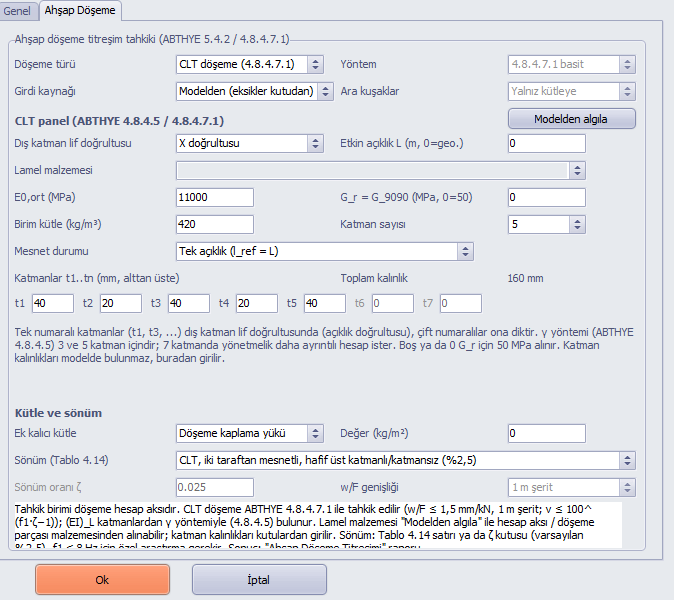
“Slab type = CLT slab”: the CLT panel appears in place of the joist and sheathing boxes.
| Field | Description |
|---|---|
| Outer layer grain direction | The load-carrying (span) direction. Since the grain direction is not held in the model, it is selected in the box; if Automatic, the short side is taken and a note is added. |
| Lamella material, E0,mean, Gr, ρ | The lamellas are timber (C24 etc.) or a CLT-type material. With the Model input source, if the material of the calculation axis or of the slab pieces (single material) is of timber/CLT type, E0,mean and ρ are taken from there. Gr (rolling shear modulus, G9090) comes from the model only for a CLT-type material (library field); if the box is empty, 50 MPa is used (the code gives no value for CLT; Design Examples Guide CLT example). |
| Number of layers, t1…tn | 3 or 5 layers; thicknesses in mm, from bottom to top. Odd-numbered layers are in the same (longitudinal) direction as the outer layer, even-numbered layers are transverse. Since the layer arrangement is not held in the model, it must be entered in the boxes. For 7 layers the code requires a detailed calculation, so the program reports an input error. A note is added if the lamella thickness is outside 20-60 mm and if the layer total differs from the slab thickness in the model by more than 5%. |
| Support condition | Single span: lref = L; Continuous, at least two spans: lref = 0.8L (ABTHYE 4.8.4.5). In the f1 equation, L is the slab span. |
Stiffness and mass
- (EI)L = E0,mean·Ix,ef, 1 m strip. Only the longitudinal layers carry load; the rolling shear of the transverse layers is taken into account with the γ method (ABTHYE 4.8.4.5, Eq. 4.149-4.164): γi = 1/(1 + π²·E0·ti/lref²·ttransverse/Gr), Ix,ef = Σ b·ti³/12 + Σ γi·b·ti·ai². With 3 layers both outer layers are reduced by γ (4.149/4.153); with 5 layers the middle layer is the basic layer (γ3 = 1).
- (EI)B = E0,mean·Iy,net: since the code gives no (EI)B formula for CLT, only the net moment of inertia of the transverse layers (Table 4.12, without γ) is used. This value is small; n40 and v become larger (safe side).
- Mass: m = ρ·tCLT + additional permanent mass (slab finish load or user value); tCLT is the total of the layers.
- Damping: Table 4.14 — CLT, supported on two sides (with a light top layer/no top layer) 2.5%; with a cast concrete layer 2.5% on two sides, 3.5% on four sides, 4% on four sides with walls.
- 4.201/4.202 are for slabs supported on four edges; for a slab supported on two edges, the slab width is taken as B.
A calculation axis to which a timber/CLT material is assigned in a CLT slab is excluded from the reinforced concrete slab calculation (Section 8). In the finite element model, the slab shell is isotropic (E0 over the whole thickness); the orthotropic stiffness of CLT does not enter the FEM, and the vibration check is independent of this.
Verification: Design Examples Guide CLT example (5 layers 40/20/40/20/40 mm, E0 = 11 000 MPa, Gr = 50 MPa, lref = 3.5 m) — guide γ1 = 0.876, Ix,ef = 268.29·10⁶ mm⁴; program γ1 = 0.8758, Ix,ef = 268.23·10⁶ mm⁴ (the difference comes from the rounding of γ in the guide).
7. Composite joist floors (ABTHYE 4.8.2)
If the sheathing is connected to the joists with mechanical fasteners (nails, screws, staples), or if there is a cast concrete layer connected with fasteners on top of the joists, the joist and the flange act together and (EI)L increases. In accordance with the last paragraph of ABTHYE 5.4.2, Kser, γ and the 4.8.2 rules also apply to connected slabs in the vibration calculation; in accordance with the introduction of Chapter 5, Kser (serviceability slip modulus) and mean E values are used (Ku and kdef are not used). Since fastener information is not available in the model, the composite inputs are entered only in the Composite (4.8.2) inner tab.
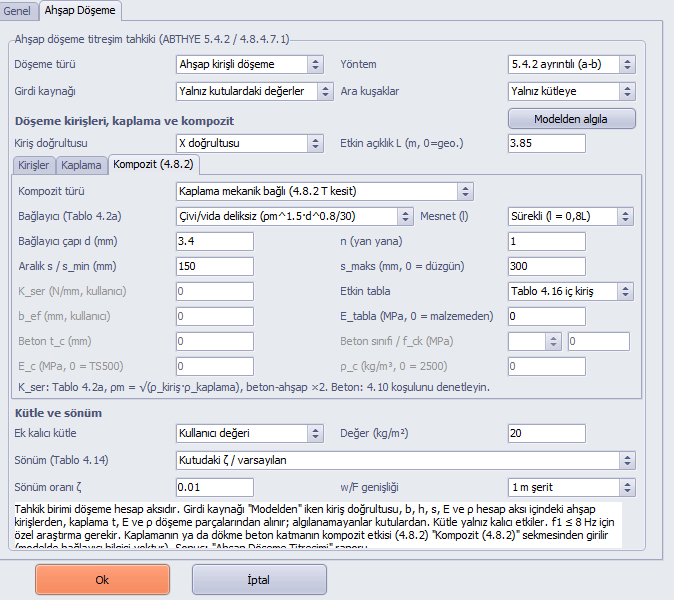
Composite (4.8.2) inner tab: OSB sheathing connected to the joists with screws without pre-drilled holes, smin/smax = 150/300 mm, continuous joist (l = 0.8L).
| Field | Description |
|---|---|
| Composite type | None (the composite effect is neglected), Sheathing mechanically connected (4.8.2 T-section), Cast concrete layer (timber-concrete). |
| Fastener (Table 4.2a) | Kser (N/mm, per shear plane and per fastener): nail/screw with pre-drilled holes, bolt ρm1.5·d/23; nail/screw without pre-drilled holes ρm1.5·d0.8/30; wire staple ρm1.5·d0.8/80; or User Kser (for example a timber-concrete fastener with a manufacturer value). For sheathing, ρm = √(ρjoist·ρsheathing) (4.46); for timber-concrete it is calculated with the ρm of the timber and multiplied by 2.0. |
| d, n, s / smin, smax | Fastener diameter, number of fasteners side by side and spacing along the joist. If the spacing is variable, seff = 0.75·smin + 0.25·smax (4.79); smin ≥ smax/4 must hold (4.78), otherwise an input error occurs. |
| Support (l) | Span in the γ calculation: l = L for a single span, l = 0.8L for a continuous joist (4.8.2 item 2). In the f1 equation, L is the slab span. If an already reduced value was entered in the effective span L box, 0.8 may have been applied twice (a note is added). |
| Effective flange | Table 4.16: OSB interior joist bw + min(0.15L; 25t), exterior joist bw + min(0.075L; 12.5t); plywood interior min(0.1L; 20t), exterior min(0.05L; 10t). If the sheathing material is not of OSB type or cannot be found, the plywood column (the smaller one) is used. The effective width is in every case limited by the joist spacing (guide example 8.2). User beff can be selected. For a concrete flange the code gives no value: beff = joist spacing. |
| Eflange | E of the flange in the joist direction. If 0, the compressive E of the OSB material record is used: Ec,90 if the strong axis of the board is perpendicular to the joists, Ec,0 if parallel (OSB/2-3: 3000 / 3800 MPa). For a board other than OSB, the bending E in the joist direction is used and a note is added. |
| Concrete tc, class / fck, Ec, ρc | Cast concrete layer. If Ec = 0, the TS 500 relation 3250·√fck + 14000 is used (the code gives none); the section is assumed uncracked. If ρc = 0, 2500 kg/m³. Sheathing (formwork board) is optional in a concrete layer; if present, it contributes to the mass and to (EI)B, and its thickness is not included in the lever arm (safe side). |
Calculation
- Mechanically connected T-section (Figure 4.27, section 10; 1 flange, 2 joists, γ2 = 1): γ1 = [1 + π²·E1·A1·s/(n·Kser·l²)]−1 (4.47), a2 = γ1·E1·A1·(h1+h2)/(2·(γ1·E1·A1 + E2·A2)) (4.87), a1 = (h1+h2)/2 − a2, (EI)ef = Σ(Ei·Ii + γi·Ei·Ai·ai²) (4.80).
- (EI)L = (EI)ef/s (joist spacing); the report also gives the value for the bare joist.
- For a concrete layer, Ec·tc³/12 of the concrete slab is added to (EI)B (sheathing and concrete slabs separately; lower bound), and ρc·tc is added to the mass. If the additional permanent mass is “Slab finish load” and this load also includes the concrete, the mass is counted twice (a note is added). If the material of the model slab pieces is of concrete type, an input error is given (since the concrete layer would be counted twice).
- The default damping for a concrete layer is 3% (Table 4.14 row 3); a Table 4.14 row or a box value can be selected.
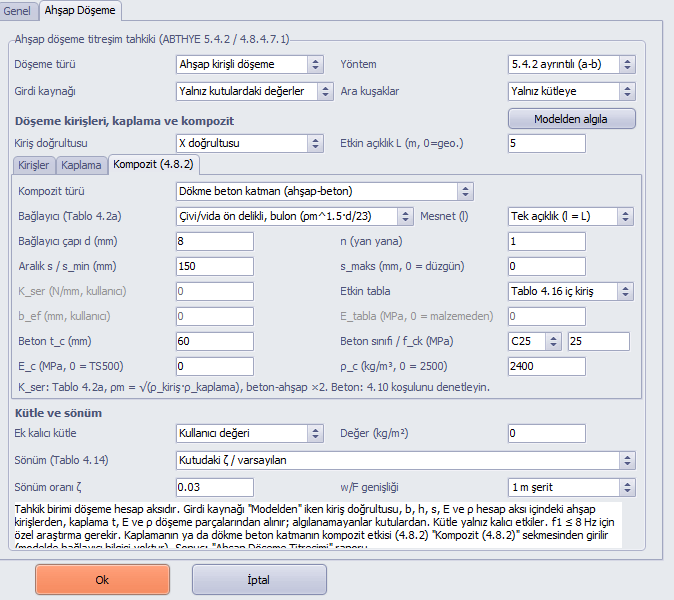
Cast concrete layer: 60 mm C25, screws d = 8 mm with pre-drilled holes, s = 150 mm; the ζ box shows the type default 0.03.
ABTHYE 4.10: concrete, reinforced concrete or similar heavy materials cannot be used in the parts of floors that are carried only by timber vertical load-bearing elements. The program does not check the supports from the model; for every composite slab with a concrete layer, an analysis warning is given and the row “Ahşap döşemede beton katman (ABTHYE 4.10)” (Concrete layer in timber slab (ABTHYE 4.10)) is written to the project checklist.
4.8.2 item 3: the composite effect assumes that the boards are full-length or glued end to end in the joist direction; for boards with only nailed joints end to end, the composite effect may be less than calculated. The Table 4.16 page requires that the joist spacing not exceed 61 cm in floors with panel sheathing; if it is exceeded, a note is added.
8. Reinforced concrete slab calculation in timber calculation axes
Calculation axes that have a vibration definition, or whose material is timber, OSB, CLT or sheathing, are considered timber calculation axes. For these axes:
- TS500 plate moments, span/support reinforcement, slab thickness check and thin-slab warning are not performed; in the “Döşeme Hesapları” (Slab Calculations) report these axes are shown with “---”.
- Slab reinforcement drawings and quantities are not produced.
- In masonry (EC6), no fixed-end moment is transferred from the slab to the wall (the timber joist sits as pinned).
- On a storey where all slabs are timber, the reinforced concrete diaphragm check (TBDY M.7.11) and the additional opening reinforcement are not performed; the timber diaphragm (sheathing shear) must be evaluated separately. This is reported as information in the analysis warnings.
Since load transfer is carried out through the slab pieces and joists, the wall, beam and earthquake results are not affected by this change.
9. Results: analysis warnings, checklist, report
| Place | Content |
|---|---|
| Analysis warnings | Per calculation axis (clicking selects the calculation axis): inadequate, f1 ≤ 8 Hz out of scope, missing input. Collective information: 2 < a ≤ 4, mass difference, non-rectangular axis, calculation axes that have a timber grid but no vibration definition, axes excluded from the reinforced concrete calculation. ABTHYE 4.10 warning for composite slabs with a concrete layer. |
| Project checklist | “Ahşap döşeme titreşimi (ABTHYE 5.4.2 / 4.8.4.7.1)” (Timber slab vibration (ABTHYE 5.4.2 / 4.8.4.7.1)): “Var” (Present) and a list if there is a problematic calculation axis, otherwise “Yok” (None). If there is a composite slab with a concrete layer, additionally “Ahşap döşemede beton katman (ABTHYE 4.10)”. |
| Report | Ahşap Eleman Raporları > Ahşap Döşeme Titreşimi (ABTHYE 5.4.2 / 4.8.4.7.1). For CLT slabs: inputs, mass, intermediate values of the γ method (γi, ai, Ix,ef, Iy,net) and the 4.8.4.7.1 checks. For composite slabs: ρm, Kser, seff, l, beff, γ1, a1, a2, (EI)ef and (EI)L of the bare joist. For each calculation axis: inputs, input source (model / box) and summary of the detected grid, mass, stiffnesses, f1, n40, v, w/F and steps 2-6, result. |
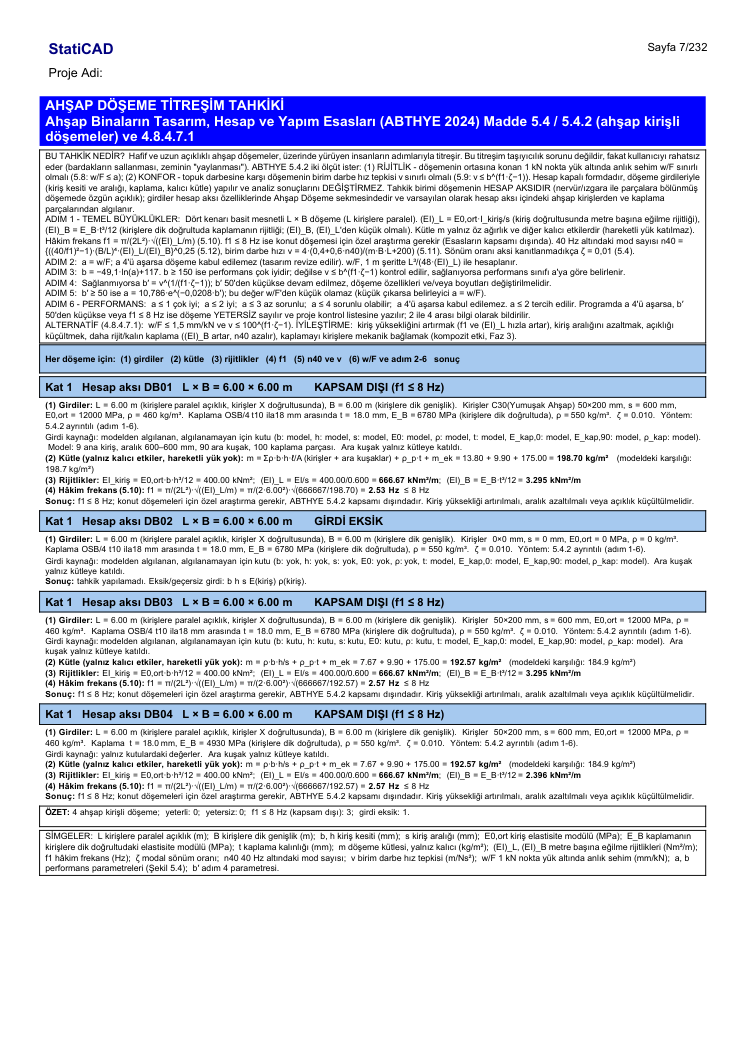
Report page: DB01 divided into ribs (inputs from the model), undivided DB02 (joist input missing), DB03 and DB04 with box values.
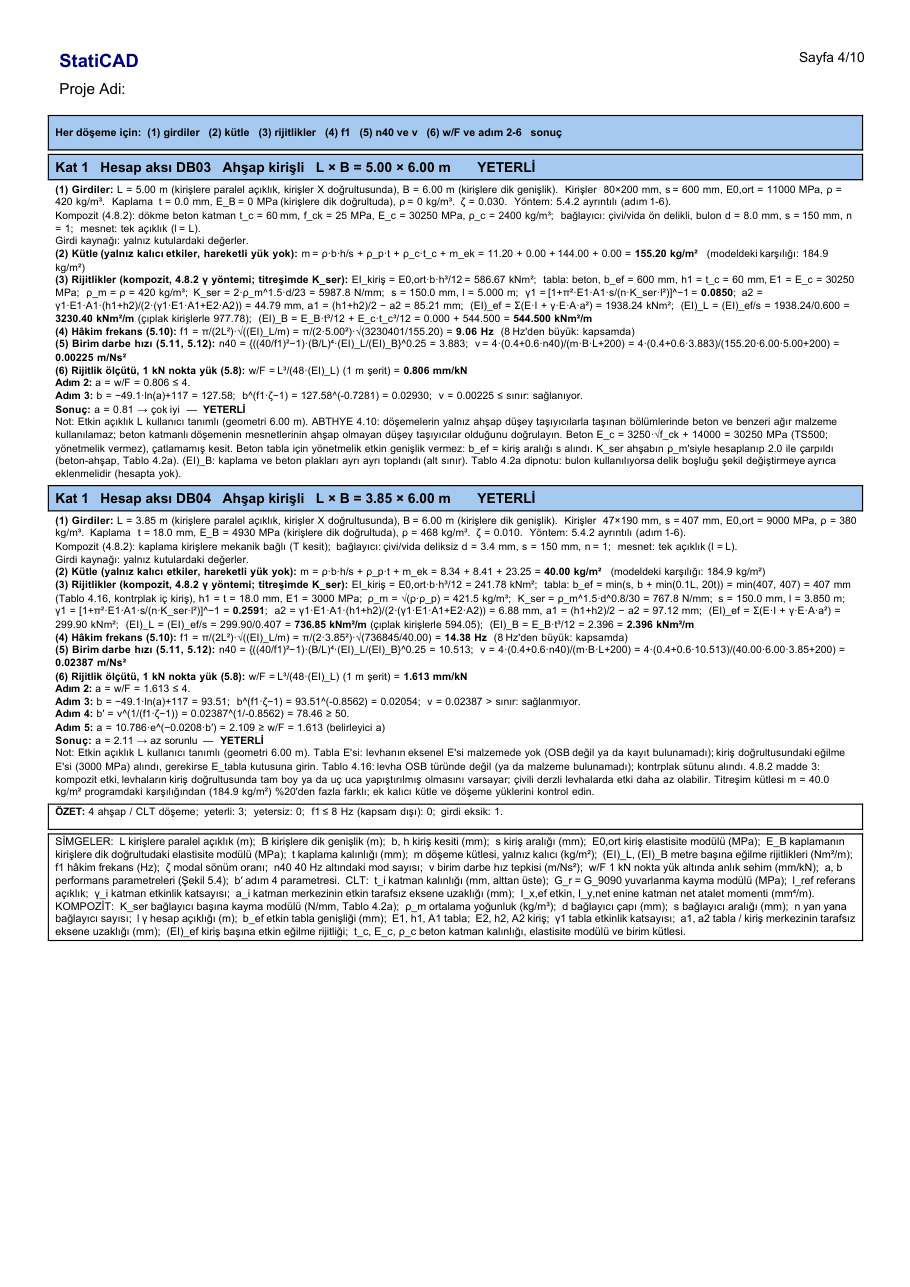
Composite slabs: DB03 cast concrete layer (Kser ×2, ζ = 0.03, 4.10 note), DB04 mechanically connected sheathing (Table 4.16 beff, γ1, (EI)ef).
10. Verification with the guide example
Timber structures guide example 7.1: C18 joists 47×190 mm, OSB/3 18 mm, L = 3.85 m, B = 4.80 m, m = 40 kg/m², composite effect neglected.
| Quantity | Guide | StatiCAD |
|---|---|---|
| (EI)L (3 joists/m as in the guide) | 725.3 kNm²/m | 725.3 |
| (EI)B | 2.396 kNm²/m | 2.396 |
| f1 | 14.27 Hz | 14.27 |
| n40 | 8.415 | 8.415 |
| v | 0.02321 m/Ns² | 0.02321 |
| w/F | 1.639 mm/kN | 1.639 |
| b′ | 80.62 | 80.61 |
| a (step 5) | 2.099 | 2.017 (code constants 10.786 / 0.0208); 2.099 with the guide constants |
In the guide example, (EI)L is taken with 3 joists per metre; a spacing of 407 mm corresponds to 2.457 joists per metre. The program uses (EI)L = EI/s: with the actual spacing, f1 = 12.91 Hz, w/F = 2.001 mm/kN, b′ = 74.77, a = 2.28 (slightly problematic) are obtained.
Composite (4.8.2) verification
| Case | Expected | StatiCAD |
|---|---|---|
| Guide 8.2 chain (γ1 = 0.6589 given; OSB 407×18, C24 47×180) | a1 = 78.84 mm, (EI)ef = 4.379·10¹¹ N·mm² | 78.839; 4.3798·10¹¹ |
| Table 4.2a, ρm = √(467.5·420), d = 3.4, d/23 | Kser = 1378.87 N/mm | 1378.873 |
| Same section, with Kser, s = 50 mm, l = 3.62 m | γ1 = 0.50343, (EI)ef = 4.01316·10¹¹ (hand calculation) | 0.50343; 4.01316·10¹¹ |
| Guide 7.1 slab as composite (Eflange = 3000, without pre-drilled holes d = 3.4, s = 150) | γ1 = 0.25913, (EI)L = 736.8 kNm²/m, f1 = 14.383 Hz, v = 0.02320 (hand calculation) | same |
| Timber-concrete (C24 80×200, s = 600, concrete 60 mm C25, screw d = 8, s = 150, L = 5 m) | Kser = 5987.78, γ1 = 0.08496, (EI)L = 3230.4 kNm²/m, f1 = 9.065 Hz (hand calculation) | same |
In the guide's example 8.2, the printed Kser (1378.87) results with d = 3.4 rather than with d = 6 in the formula, and the printed a2 = 20.40 is inconsistent with the chain (20.16 from the chain); values with consistent arithmetic were used in the verification. The guide has no composite vibration example; the hand calculations were made with the relations of the code.
11. Scope and limits
- This edition covers timber joist slabs (including the composite effect: mechanically connected sheathing and cast concrete layer, 4.8.2) and CLT (3 and 5 layers) slabs. CLT with 7 or more layers, CLT with a concrete layer, cantilever joists (l = 2l), machine vibration (5.4.1) and finite-element-based f1 are out of scope. There is no ready-made CLT/GL record in the library; the timber class (C24 etc.) is selected for the CLT lamellas.
- Relations for rectangular slabs simply supported on all four edges are used. For continuous, cantilevered or irregular slabs, the engineer must determine the effective span.
- Polygonal slabs and slabs without a drawn calculation axis cannot be checked; if necessary, draw a calculation axis with the Rectangular Calculation Axis tool.
- The mass input is the responsibility of the engineer: only permanent actions are used in vibration.
12. File compatibility
The inputs are stored in the project file together with the calculation axis. When projects saved before this feature are opened, the type is “None” on all calculation axes; in projects saved before the CLT or composite inputs, existing definitions are preserved and the new fields come with their default values (composite “None”).