Multi-Mode Pushover Analysis and IRSA
Single-mode pushover analysis is valid for buildings whose seismic behaviour can be represented by a single dominant vibration mode. This article describes the multi-mode pushover, IRSA and adaptive single-mode pushover options used when this condition is not satisfied or when higher-mode effects are to be examined, together with the 3D display of pushover results. For the basic pushover workflow, see the article How to Perform a Nonlinear Pushover Analysis.
1. When is it used?
According to TBDY 2018 Clause 5.6.2.2, single-mode pushover may be used under the following conditions:
- The effective mass participation ratio of the dominant mode must be at least 70%,
- The torsional irregularity coefficient must be ηbi ≤ 1.4.
If either of these conditions is not satisfied, the code requires multi-mode pushover (5.6.6) or nonlinear time-history analysis (5.7). StatiCAD checks both conditions automatically and shows them in the pushover report. Even when the conditions are satisfied, multi-mode pushover can also be run as an additional check to see the higher-mode contributions on upper-storey members.
2. Enabling the options
- Open the project and complete the static analysis.
- Open the Analysis → Nonlinear Pushover Analysis window.
- Select the directions to be pushed from the direction boxes (e.g. +X+0.3Y and −Y−0.3X). The multi-mode run uses the principal direction and sign (+X, −X, +Y, −Y) of the directions you selected; the orthogonal component with the 0.3 factor is not applied in the multi-mode run, because the modal load pattern already contains the Fx, Fy and torsion (Mz) components together.
- Check the required options in the lower part of the window:
| Option | Description |
|---|---|
| Multi-mode pushover (MPA, 5.6.6) | Modal pushovers are performed in the selected principal directions, and the member end plastic rotations are combined with the CQC rule to give the building decision. |
| IRSA multi-mode incremental pushover | The pushover advances in the linear segments between hinge formations together with the spectral increments of all modes; in each segment the modal analysis is renewed with the current stiffness (see Section 4). |
| Adaptive single-mode pushover (5.6.5) | The load pattern is renewed from the current mode shape at every hinge formation; comparison lines with the fixed pattern are added to the progress window. |
| P-Delta (2nd-order geometric stiffness) | If checked, all pushover runs (single-mode, multi-mode, adaptive) are performed with the geometric stiffness including axial force, and a “DİKKATE ALINDI” (TAKEN INTO ACCOUNT) line appears in the report. |
- Click the Analysis button. First the selected single-mode direction combinations, then the multi-mode and IRSA sections are written to the progress window.
Like the other pushover settings, these options are saved in the project file. They appear unchecked when old project files are opened.
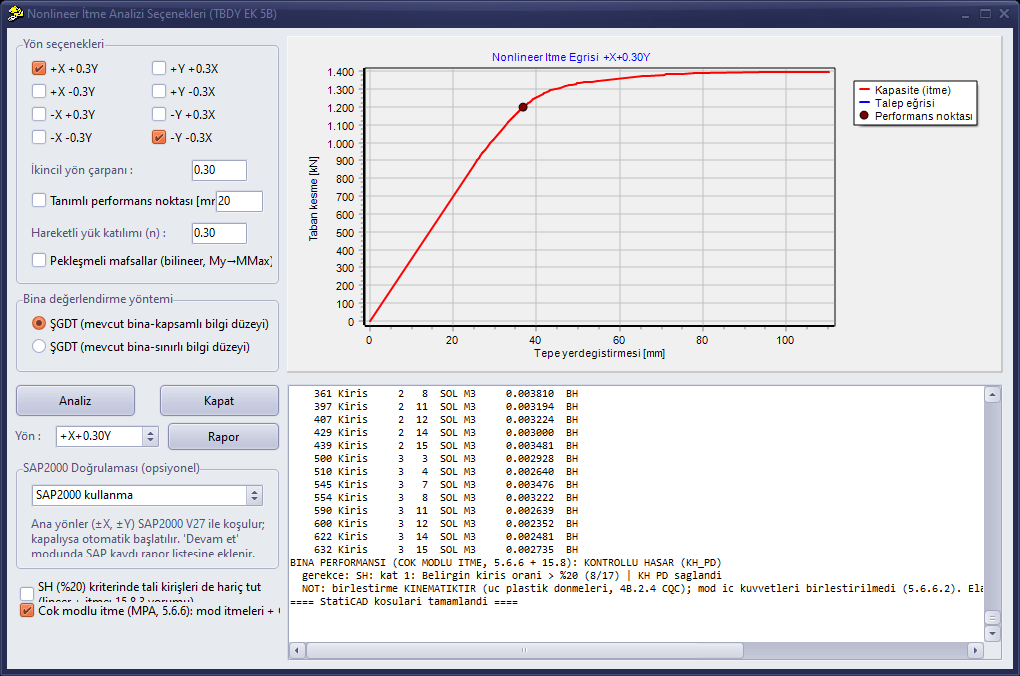
The multi-mode option in the pushover window (bottom left) and the combined building performance decision of the multi-mode pushover in the progress window.
3. Reading the multi-mode pushover results
The multi-mode pushover section contains the following information for each principal direction:
| Information | Meaning |
|---|---|
| Number of selected modes and cumulative participation | Modes with a participation above 1% in the principal direction are selected until the cumulative participation reaches 95%. |
| Mode table (T, participation, Sae, CR, demand) | For each mode: its period, effective mass ratio in the principal direction, elastic spectral acceleration, displacement amplification coefficient and roof displacement demand. For short-period higher modes CR > 1 (Annex 5B); the demand of higher modes is small. |
| Number of yielded ends | The number of ends that have become plastic at the demand point of that mode. Higher modes generally remain elastic; this is the expected behaviour. |
| CQC roof displacement | CQC combination of the modal roof demands (for information). |
| Storey drift profile | CQC combination of storey displacements and inter-storey drifts; shows the higher-mode contribution in the upper storeys. |
| Damage table | Values of member end plastic rotations combined across modes with CQC, and the damage regions. |
| Building performance (multi-mode) | The combined building decision according to TBDY 15.8 and its justification. |
Important: In accordance with TBDY 5.6.6.2, modal internal forces are not combined statistically; the assessment is made on the basis of deformation (end rotations). The moment column in the damage table is not a combined value; it shows the demand moment of the dominant mode only for information.
The same section also gives, for information, a total rotation assessment (reading of the combined end rotation demands in TBDY 5.6.6.2). Because of the yield-rotation formula assumptions, this reading is typically conservative; the main decision is given by the CQC combination of the plastic rotations.
At the end of the pushover report obtained with the Report button after a multi-mode run, a summary of the latest multi-mode run made in the principal direction of the selected record (mode table, CQC roof displacement, storey drift profile and combined building decision) is added automatically.
Elastic consistency (TBDY 5.6.6.1): When the method is applied with elastic stiffnesses, it must give the same displacements as the linear analysis with mode combination. StatiCAD makes this comparison numerically for each mode and for the CQC combination and shows the result.
4. IRSA — incremental mode combination
If the IRSA (Incremental Response Spectrum Analysis) option is checked, IRSA runs are also performed for the principal directions of the selected directions at the end of the analysis flow. In IRSA, the pushover advances in the linear segments between hinge formations together with the spectral increments of all modes, and in each segment the modal analysis is renewed with the current stiffness. In this way, the effect of a hinge changing the shapes and periods of all modes is taken into account step by step.
The default method is full IRSA: the load pattern of each segment is built with the spectral acceleration at the current period, and the CR amplification is applied step by step at short periods. The growth of the seismic demand of the softening structure is thus included automatically.
The IRSA output contains the elastic consistency check, the segment table (increment, current period, opened ends), roof demand and base shear, storey profile, damage table and the IRSA building performance decision. A summary of the IRSA run made in the same principal direction is also added at the end of the pushover report.
5. 3D display of pushover results
After a pushover run, the deformed shape and plastic hinges of the pushover analysis can be followed in the 3D viewer of the Finite Element System window. In the Displacement tab of the display options window:
- Pushover is selected from the Loading list (this option appears if at least one pushover run has been made in the session).
- The direction combination to be displayed is selected from the Pushover run list.
- The Step slider is used to move along the pushover curve. The information line below the slider shows the base shear, roof displacement, number of plastic hinges and building performance level of that step; the demand step is additionally marked with the (İSTEM) (DEMAND) label. As the slider moves, the 3D view is refreshed live.
- The Show Displacements box must be checked. Display Scale is the magnification factor of the deformation; when Pushover is selected for the first time, the scale is automatically set to a value suitable for pushover displacements (1000) and can be changed freely.
Plastic hinges are shown with coloured square markers at the member end where they occur:
| Colour | Damage region |
|---|---|
| Blue | Limited Damage |
| Green | Significant Damage (yielded, below the Controlled Damage limit) |
| Yellow | Advanced Damage (between the Controlled Damage and Collapse Prevention limits) |
| Red | Collapse region (Collapse Prevention limit exceeded) |
The markers are always drawn on top and do not disappear behind slab shells. If the Show Member Names box is checked, the member name and damage region are also written next to each hinge.
6. Frequently asked questions
Why did the multi-mode result differ little from the single-mode one? If the participation of the dominant mode is high (for example 79%) and the higher modes remain elastic, the combined plastic rotations are very close to those of the dominant mode and the decision is usually the same. The difference becomes noticeable in buildings with low dominant-mode participation (50–60%), torsional buildings or tall buildings.
Why can −X differ from +X? If the reinforcement layout and geometry are asymmetric, the pushover direction changes the capacity. The multi-mode run is made separately for each of the signed directions you selected.
I see “Number of selected modes = 1”; is this normal? If a single mode provides 95% participation in the principal direction, it is normal; in this case the multi-mode result is equivalent to the single-mode one.
Does multi-mode pushover replace nonlinear time-history analysis? No static pushover method is a full equivalent of nonlinear time-history analysis. For critical and irregular structures, an additional assessment according to TBDY 5.7 is at the engineer’s discretion.