Roof Wizard (Automatic Roof)
This article describes how the roof wizard (automatic roof) in StatiCAD builds a complete timber hip, gable or mixed roof from a roof polygon in one step. To add individual trusses and purlins, see Roof Truss Wizard and Automatic Purlins Between Trusses.
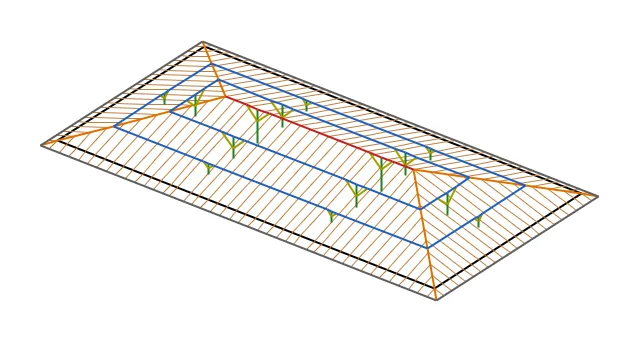
Figure 1 – Hip roof built on a three-storey reinforced concrete building (3D preview)
1. About this article
From a roof polygon and edge slopes the wizard builds the geometry of a hip, gable or mixed roof and adds the complete timber framing to the analysis model in one step: rafters, purlins, ridge beam, hip and valley rafters, verge rafters, posts, struts and fascia. The cladding load is applied as a rafter line load, or a polygon slab is meshed onto the roof surface.
Which editions? The roof wizard is available in all editions of StatiCAD (like the truss and purlin wizards).
The examples use a three-storey 20 × 10 m reinforced concrete building: the beam axes of the top storey are taken as the roof polygon and a hip roof with a 33% slope is built.
2. How it works
2.1. Roof geometry
The roof polygon is the bearing line: the wall or beam axis on which the rafter feet rest. Each edge gets a slope (percent); an edge marked as gable has a vertical roof surface (the gable wall of a pitched roof). The wizard offsets the edges outwards by the eave overhang to get the eaves line and builds the roof with the weighted straight skeleton method: each edge's surface rises with its own slope, and the lines where the surfaces meet become the ridge (horizontal), hips (convex corners) and valleys (concave corners). The method gives the correct roof for non-rectangular plans as well (L, T, U and polygons with skewed edges); different edge slopes and gables can be combined.
The eave overhang is a horizontal dimension and applies to edges at the default slope; on edges with a different slope the overhang is adjusted so that the eaves stay at the same level on every face (continuous gutter line). Gable edges are extended further by the "gable overhang"; the ridge and purlins project beyond the gable wall and their ends are tied by the verge rafter.
2.2. Members
| Member | Placement | Connection |
|---|---|---|
| Rafter | On each face perpendicular to the eaves, at the given spacing, symmetric about the middle of the face. Shortened next to hips and valleys (jack rafters). | Split at the bearing line and at purlin crossings (continuous beam). Pinned at the ridge/hip/valley end. The eave end is a cantilever. |
| Purlin | Contour lines: at the same levels on all faces, forming a ring that meets at hips and valleys. A purlin very close to the top of a face is omitted (the ridge beam is enough). | In the plane of the rafter axes (concentric). Pinned ends. Split at post and strut points. |
| Ridge / hip / valley | Skeleton lines. Collinear pieces form a single member. | Split at the bearing line, at purlin ends and at post points. |
| Verge rafter | Along the outer line of the gable overhang. | Rafter section. |
| Post | Under purlins and the ridge; bottom end at storey top level (Section 6). | Pinned bottom, continuous top; StatiCAD "truss post" type (receives no automatic support). |
| Strut | From each post to both sides, along the purlin/ridge it carries; at the given angle to the post. | Pinned at both ends (axial only). Shortened at the same angle if it does not fit on the post. |
| Fascia | Along the eaves line, ties the rafter tails. | Continuous. |
| Wall plate | Along the bearing line (optional, off by default). | Coincides with an RC beam if there is one on the bearing line. |
| Timber column (standalone roof) | Under every rafter, hip/valley and gable node on the bearing line, from the storey base (Section 4.3). | Timber Column/Post type: the base receives an automatic support, the top is continuous. |
2.3. Connection to the analysis model
In the finite element model two members are not connected unless the end of one lies on the other. The wizard therefore creates every connection point explicitly:
- Edge snapping: the finite element node line of an edge beam is on its defined axis, not at the beam centre (12.5 cm outwards from the centre in the example). With "Snap edges to beam FEM lines" on (default), polygon edges are moved onto the node line of a parallel beam within 30 cm; rafter feet and hip ends are then connected to the beam.
- Splitting: rafters are split at purlin crossings, purlins and the ridge at post and strut ends, hips and valleys at purlin ends.
- Merging: ends closer than 6 cm are merged (so that beams shifted within the program's 5 cm node tolerance do not miss a connection).
- Column footprint: the program links a beam end that falls inside a column's plan footprint to the column axis with a fictitious beam. This link is made only when the beam end is within the column's elevation range; rafter, ridge and purlin ends high above a column top are not linked to the column. Rafters therefore keep their full length and regular spacing on column lines as well.
3. Opening the wizard and the roof polygon
The wizard is opened from three places: the Roof button on the left toolbar (below the Truss and Purlin buttons), Draw › Roof (automatic roof wizard)... and Macros › Roof wizard (automatic roof).... The roof is built on the active storey; the wizard does not open on the foundation level.
The roof polygon is given in one of two ways:
- Selected polygon slab: if a polygon slab is selected in plan when the wizard opens, its corners become the roof polygon. While the window is open, the "From selected polygon slab" button can be used as well. The cladding option then switches to "Mesh the source polygon slab onto the roof" automatically.
- Drawing in plan: the "Draw in plan" button closes the window; click the corners of the bearing line in order on the plan (Shift: orthogonal). Clicking the first point or a right click closes the polygon (at least 3 points) and the wizard opens again. Intermediate points on a straight line are merged.
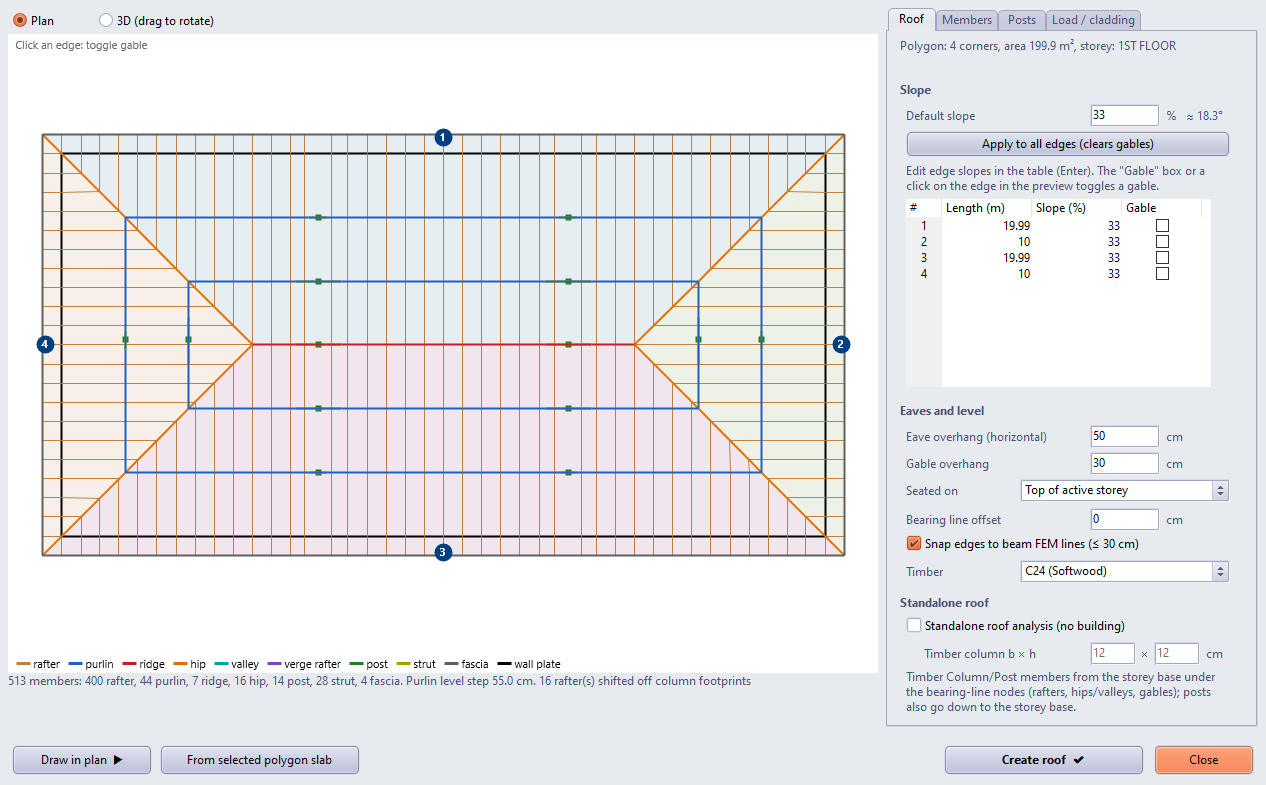
Figure 2 – Roof wizard: plan preview on the left (faces, members, edge numbers), Roof tab on the right
4. Roof tab
4.1. Slope and gables
Default slope (percent; the angle in degrees is shown next to it) is the slope of new edges; "Apply to all edges (clears gables)" sets every edge to this slope and removes the gables. The edge table lists the length, slope and gable state of each edge. The slope cell can be edited; the new value is applied with Enter or when you move to another cell. Ticking the Gable box, or clicking an edge in the preview, toggles the gable (at least one edge must remain sloped). Edge numbers are shown in circles in the preview; gable edges are purple.
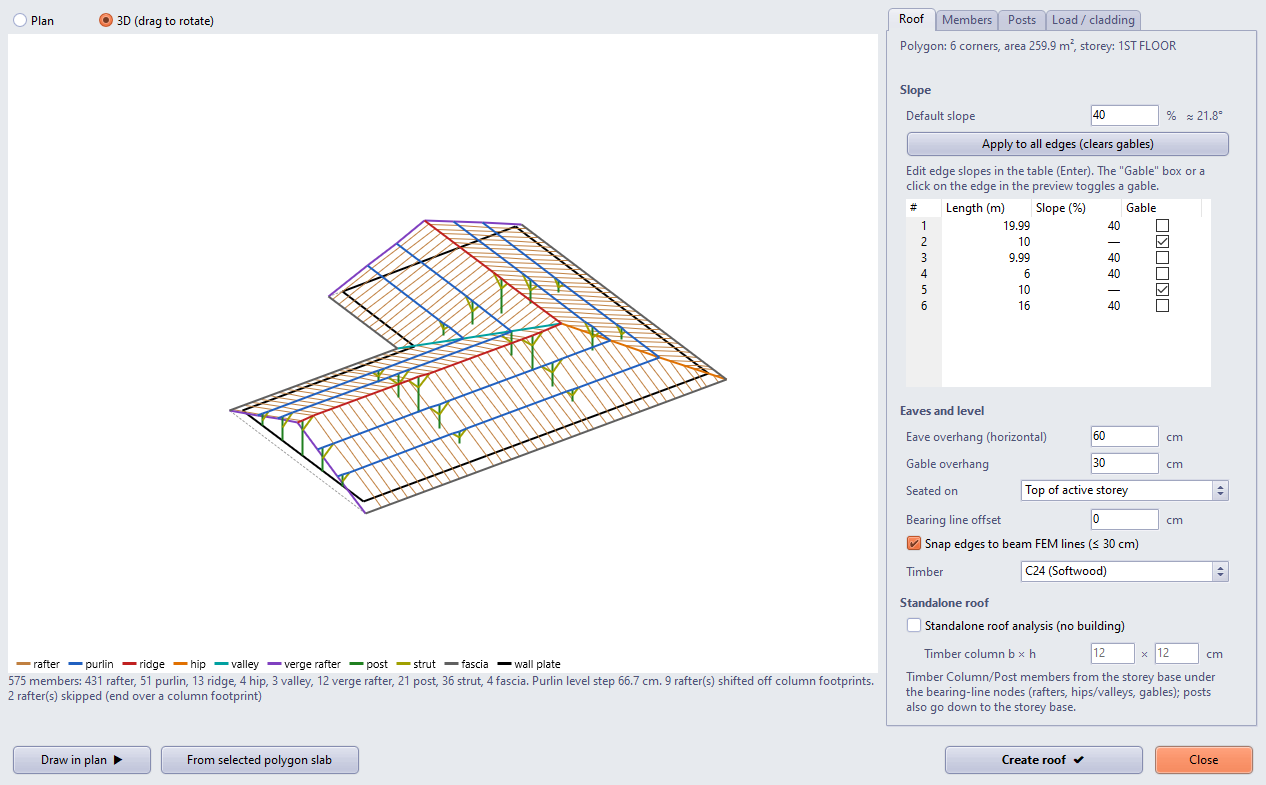
Figure 3 – L-shaped roof: two wing ends are gables, a valley at the inner corner; the 3D preview is rotated by dragging with the mouse
4.2. Eaves and level
| Setting | Description |
|---|---|
| Eave overhang (horizontal) | Projection of the rafter tails beyond the bearing line (default 50 cm). |
| Gable overhang | Projection of the ridge and purlins beyond gable edges (default 30 cm). |
| Seated on | Top of active storey (default): the roof rests at the slab/beam level of the top storey. Base of active storey (roof storey): on a separate roof storey, the roof rests at the storey base (on the beams of the storey below); on a storey without slabs the wizard selects this itself. |
| Bearing line offset | Height of the rafter feet above the seating level (e.g. a knee wall). |
| Snap edges to beam FEM lines (≤ 30 cm) | Section 2.3. |
| Timber | Material of all roof members (project and library timbers). |
Separate roof storey and modal analysis: In a modal analysis with a rigid diaphragm, no node is tied to the diaphragm master of a roof storey without slabs, so the modal solution may not converge. When the roof is analysed together with the building, place it on top of the top storey (default).
4.3. Standalone roof analysis
To analyse the roof on its own, independent of a building (for example in an empty project), tick Standalone roof analysis (no building). Timber Column/Post members are then placed from the storey base under the nodes that would normally rest on beams: the rafter feet behind the eaves, the hip and valley corners, and the purlin and ridge nodes on gable lines. They come in as timber columns, not truss posts, so their bases receive automatic supports. The column section is set with "Timber column b × h" (default 12 × 12 cm).
The posts under purlins and the ridge also go down to the storey base and become timber columns; ticking the option switches the post placement to "Equal spacing". The roof rests on top of the active storey; the seating level and beam snapping are not used (they are greyed out).
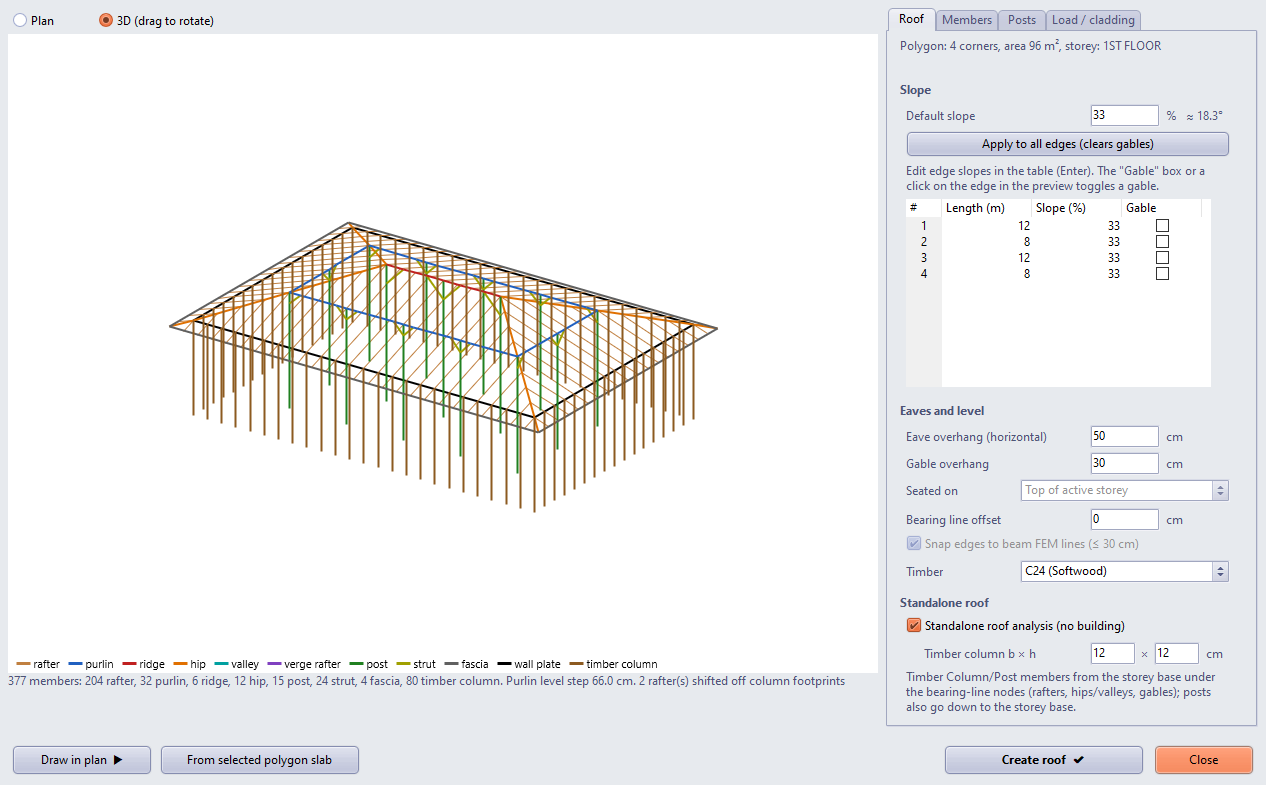
Figure 4 – Standalone roof analysis: timber columns from the storey base under the rafter feet, posts going down to the storey base; the option on the Roof tab on the right
Number of columns and analysis: One column is placed under every rafter foot, so the column spacing equals the rafter spacing (80 columns for the 12 × 8 m example). In an empty project, the analysis of 10 × 6 m and 45 × 24 m hip roofs completed without floating-member or singular-matrix warnings; the column bases received fixed supports.
5. Members tab
Rafter spacing and section; purlins (on/off, horizontal spacing at the default slope, section); ridge beam; hip/valley rafters; verge rafter; fascia and wall plate are switched on or off individually and their sections (b × h, cm) are entered. Default sections: rafter 5 × 10 (50 cm spacing), purlin 10 × 12, ridge 12 × 16, hip/valley 10 × 16, post 10 × 10, strut 8 × 10, fascia 3 × 15.
Purlin levels are found by dividing the height of the roof's highest point evenly: the spacing is the horizontal distance at the default slope (e.g. 200 cm × 33% → a level step of at most 66 cm). The summary line shows the actual level step.
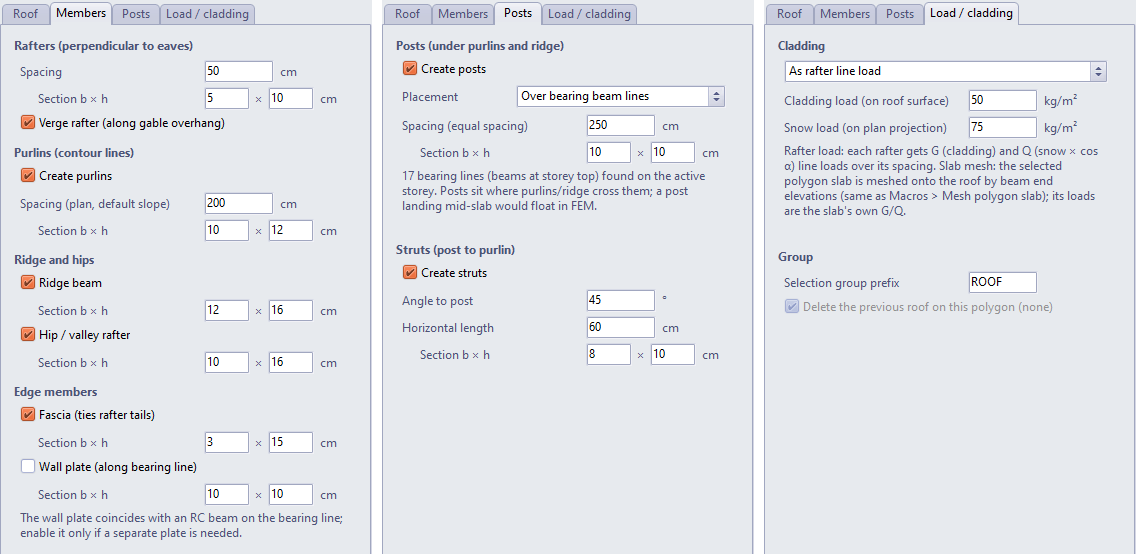
Figure 5 – Members, Posts and Load / cladding tabs
6. Posts and struts
Posts are placed under the purlins and the ridge beam. There are two placements:
| Placement | Description |
|---|---|
| Over bearing beam lines (default) | A post is placed where a purlin/ridge crosses, in plan, a beam at storey top level; its bottom end rests on the beam's node line and is connected to the beam in the analysis. For a purlin/ridge with no beam underneath, the summary shows a warning. |
| Equal spacing | Posts are distributed evenly without exceeding the given spacing. If there is no beam under their bottom ends they float in the analysis (a slab shell gets no interior node); the program warns. |
Struts are placed from each post to both sides of the member it carries, at the given angle to the post (default 45°) and with the given horizontal length (default 60 cm). If the vertical length does not fit on the post, the strut is shortened at the same angle; a side that is too close to the neighbouring post is skipped.
Purlin span: When posts are placed only on bearing lines, the purlin span can be as long as the beam spacing (6.5 m in the example). After the member checks, if needed, choose equal spacing and add beams under the posts, or increase the purlin section.
7. Load / cladding tab
| Option | Description |
|---|---|
| As rafter line load | Each rafter receives, over a width equal to its spacing, the cladding load G (on the roof surface, kg/m²) and the snow load (on plan projection, kg/m² × cos α) as line loads (the beam's extra G and Q loads, kg/m). Defaults: G = 50, snow = 75 kg/m². |
| Mesh the source polygon slab onto the roof | If the roof polygon was taken from a polygon slab, the slab is fitted to the roof surface with a triangular mesh based on the beam end elevations (same as Macros › Mesh polygon slab by beam end elevations (TIN - roof cladding); see Automatically Adjusting Roof Sheathing and Post Elevations). The loads are the slab's own G/Q values; use a thin, light slab for the cladding (e.g. OSB). Nodes below the roof surface (post bottoms, struts, truss bottom chords, storey beams under the roof) are not used in the mesh; their number is reported in the summary. |
| No load | No additional load is applied to the roof members (self-weight only). |
Selection group: all members are placed in a single selection group (ROOF-01, ROOF-02 …; the prefix can be changed); the group can be selected and deleted. If "Delete the previous roof on this polygon" is ticked, running the wizard again with the same polygon removes the previous roof and builds the new one (within the session).
8. Creating the roof and the result
"Create roof" adds the members to the model; the result window shows the group name, the number of beams and posts, the member list and warnings. An undo record is taken before and after the operation: Undo removes the roof in a single step.
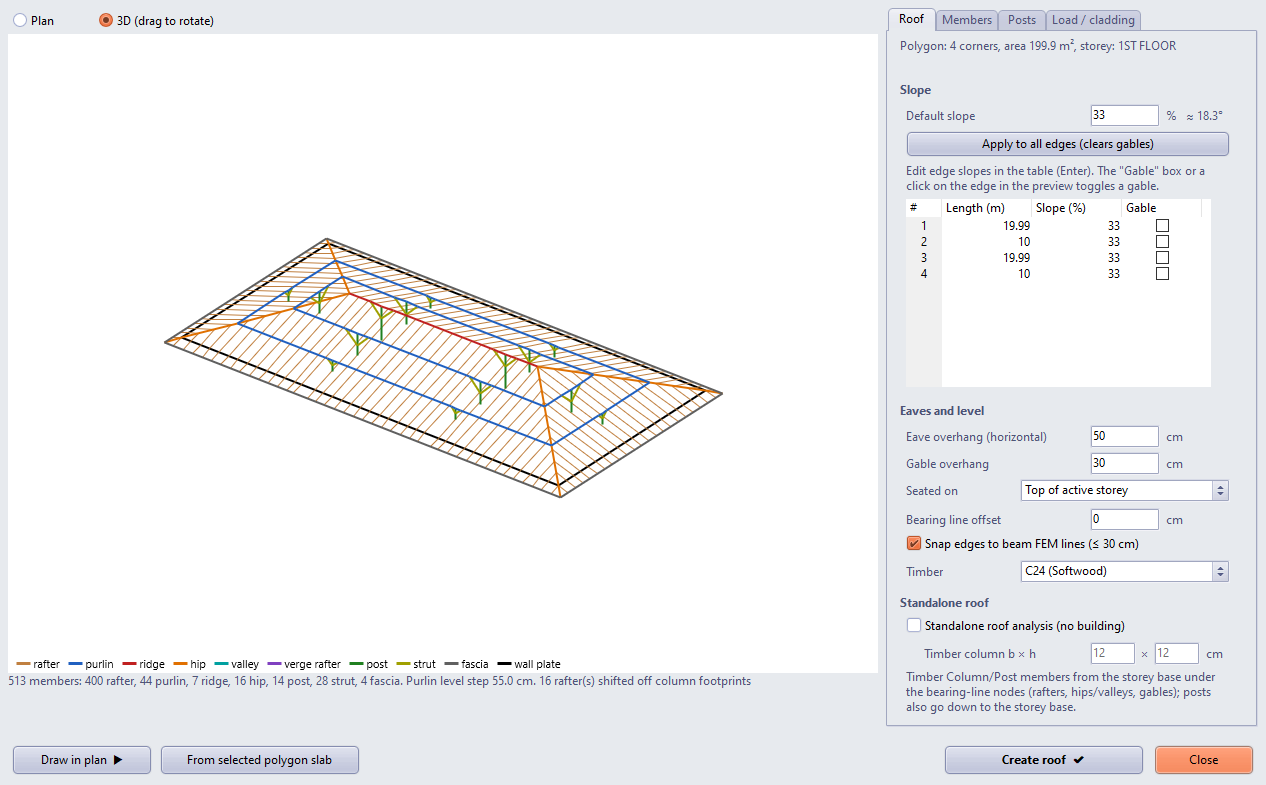
Figure 6 – Example hip roof (3D preview): purlin ring, ridge, hips, posts on the beam lines and struts
9. Analysis notes
- For the example hip and gable roofs the analysis completed without warnings: no floating member group, no singular stiffness matrix, a normal modal analysis.
- The "Partial error occurred during the load transfer" rate may change with the roof: this is a total check in the classical load path (storey total load against the load reaching the vertical members of the ground storey). Because the posts rest on beams, the roof load is not traced in the classical path; the finite element solution is not affected.
- The note "calculation axes containing a timber joist grid but no vibration definition" comes from timber beams above the slabs of the top storey; no vibration check is required for the roof.
- Rafters, purlins and the other members are checked with the timber beam and column design; update the sections according to the results.
10. Limitations
- The parameters are not saved with the project; the members are saved as ordinary beams and posts. To change the roof, run the wizard again with the same polygon ("delete the previous roof" applies within the session) or delete the group and build it again.
- Roof openings, dormers, battens, collar ties (purlinless roof) and post bracing are not available yet.
- In a standalone roof a column is placed under every rafter foot; sparser columns carrying a plate beam are not available yet.
- Curved polygon edges are not supported; if a very short edge combined with a large eave overhang makes the eaves line self-intersect, the wizard warns.