Installing the 64-Bit Version
You can try to solve your very large files without running into memory problems by using the 64-bit version.
In your customer panel ( https://www.staticad.com.tr/oz/giris.aspx ) install the StatiCAD Professional V.X.X.X.X Setup (64 Bit) and StatiCAD-Lock VX programs. When installing the 64-bit version, you do not need to uninstall the 32-bit version; since they are installed in different folders, they can run at the same time.
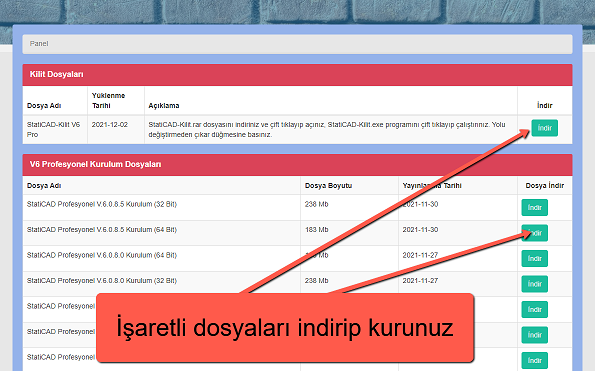
Download and install the latest 64-bit setup file and the lock file from your panel.
Possible Problems and Solutions
1- For Version 5 users: if the Özdemir Software splash screen appears but the program does not open, copy the two files named Set1.ayr and Set3.ayr inside C:\StatiCAD\YigmaV5Pro and paste them into the C:\StatiCAD\YigmaV5ProX64 folder.
2- If a warning appears at program startup stating that a dll file is missing:
a- Download and install the driver package from https://www.staticad.com/download/vc_redist.x64.rar.
b- If the error continues or the installation could not be completed, download the missing dll files from https://www.staticad.com/download/RuntimeDosyalar64Bit.rar, extract them with WinRAR, and paste the dll files into the folder under C:\StatiCAD\ that matches your version — VXProX64 or YigmaVXProX64, or, for Ultimate version users, the Ultimatex64 folder.
3- If, after the 64-bit program opens, a 'Provider Not Found' error occurs while opening a file, or an error message appears while the wall-properties window is opening:
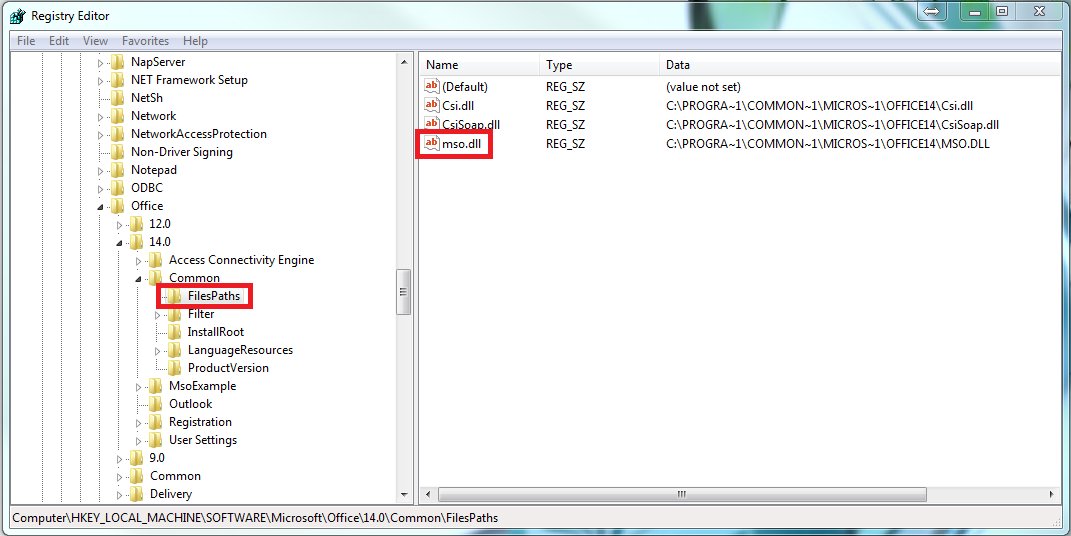
download and install https://www.staticad.com/download/SaglayiciBulunamadiHatasiDuzeltme64Bit.rar. Check whether your Office program (Word or Excel) opens correctly. If an error such as "Reconfiguring" appears during startup (in the Office program), type regedit in the Windows search bar and press Enter; then delete the "mso.dll" file located at "HKEY_LOCAL_MACHINE\SOFTWARE\Microsoft\Office\14.0\Common\FilesPaths", or rename it (for example, to mso2.dll).
4- If you receive a 'file not found' warning even though you clicked the StatiCAD shortcut, the antivirus program may have deleted the program's exe file. In this case, pause the antivirus program's real-time protection, install the program, and add an exception (scan exclusion) for the C:\StatiCAD folder.
We wish you good work.