Important considerations for integrated StatiCAD and SAP2000 analysis
1-After the model created in StatiCAD is exported to SAP2000 and analyzed, the SAP2000 analysis results can be imported back into StatiCAD. Importing a project created in SAP2000 into StatiCAD is not currently possible.
2-If you can perform the modeling within StatiCAD, after exporting to SAP2000 you can modify wall thicknesses, apply the desired mesh or subdivision to the model, and then import the SAP2000 results. However, if you add new elements inside SAP2000 after exporting, StatiCAD will not take those new elements into account.
3-If you cannot complete the SAP2000 export/import operations in a single session, save the StatiCAD data files and the data files exported to SAP2000 separately. Make and save your SAP2000 changes at a convenient time. To re-establish the StatiCAD–SAP2000 connection in a new session, export the data from StatiCAD to SAP2000 again. In the SAP2000 window that opens, open the SAP2000 data file you previously edited and saved (run the analysis if you have not already done so), then click the option inside StatiCAD to retrieve the SAP2000 analysis results.
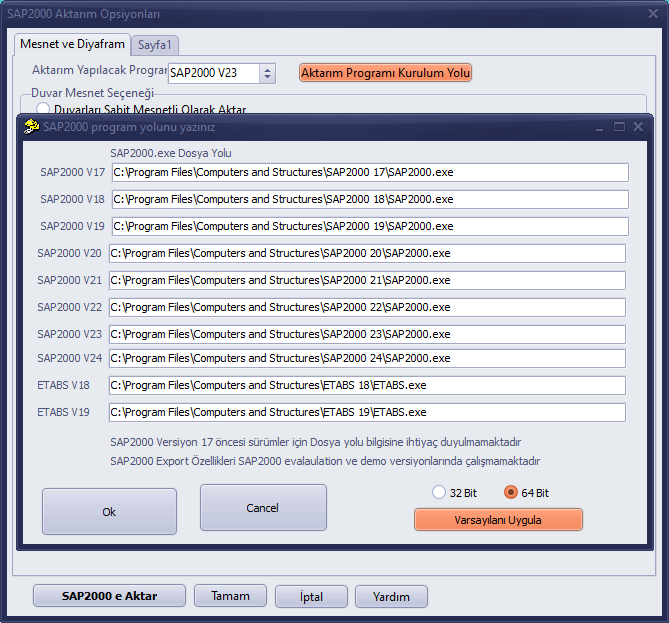
4- If you receive a "Variant or safe array index out of bounds" error during the SAP2000 transfer, the installation path of the transfer program may not have been entered or may have been entered incorrectly — please check it.