OUT OF SYSTEM RESOURCES Error
In some large projects, an OUT OF SYSTEM RESOURCES error may occur when performing calculations with finite elements.
Solution Suggestions:
1-Including slabs in the system stiffness, transferring loads from slabs to walls using shell finite elements, and having a fine slab mesh increases the amount of RAM required.
2-If you are using the 32-Bit version of the program, switching to the 64-Bit version may resolve the issue. For installation details, click here
Explanation: For 32-Bit programs, Windows allocates a maximum of approximately 1 GB of RAM to the program. Insufficiency may occur due to the size of the system stiffness matrix in the finite element analysis and the additional RAM usage by the accelerator methods used for the solution. If RAM is insufficient, the 32-Bit program will attempt to continue the analysis using our 64-Bit equation solver. However, in some cases, the OUT OF SYSTEM RESOURCES error may also occur during the preparation of the finite element model by StatiCAD before reaching the matrix solution phase.
In the 64-Bit version of the program, since all available RAM in the computer can be allocated to StatiCAD, the likelihood of an OUT OF SYSTEM RESOURCES error occurring is lower.
3-If you are using the 64-Bit version but continue to receive the OUT OF SYSTEM RESOURCES error during analysis, check the amount of RAM in your computer. 8 GB or more RAM should be sufficient depending on the project size. If there are programs running during the analysis that consume a large amount of RAM, closing them may be a solution. If your computer's RAM capacity is low, you can purchase additional RAM and have it installed by a technician. When RAM is added to a computer, it does not need to be reformatted. You can continue using the same computer with higher performance.
4-If you do not want to increase the RAM in your computer, you can reduce the RAM usage of the project analysis using the following methods:
a) When this option is checked, the analysis is performed faster and with less RAM. There will be a slight change in the distribution of vertical stresses transferred from slabs to walls.
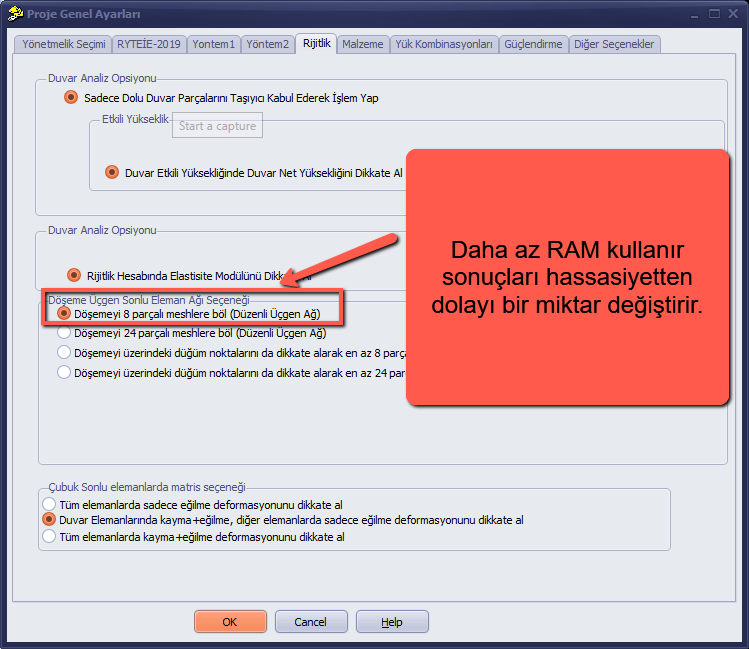
b)
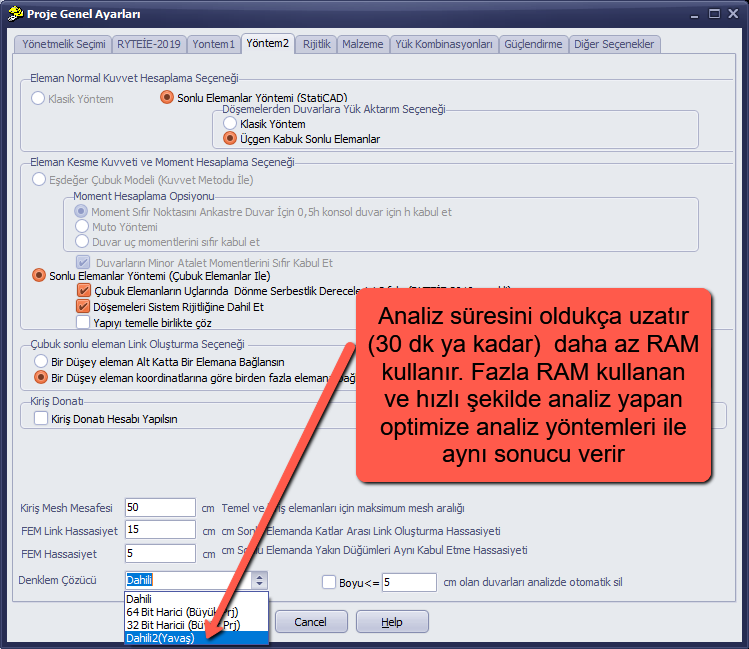
5-Since you can install StatiCAD on as many computers as you wish, you can install the 64-Bit version on a computer with a higher RAM capacity and perform the analysis there.
6-Starting from StatiCAD V.6.0.8.5, the program's RAM usage has been reduced by approximately 50% and the analysis time by approximately 80%. You can install the latest version on your computer (an upgrade fee is required for users of versions prior to Version 6).
7-If you are using the latest version but still cannot resolve the issue, you can send us your project file (the file with the .sy3 extension) by email and we can provide you with the analysis report.