

StatiCAD assesses the seismic performance of existing reinforced concrete buildings per TBDY 2018 Chapter 15: assessment with the linear calculation method, deformation-based nonlinear pushover analysis, and multi-mode pushover for buildings where single-mode pushover is not sufficient. Member damage regions, the building performance level and the rationale for the verdict are in a single report.
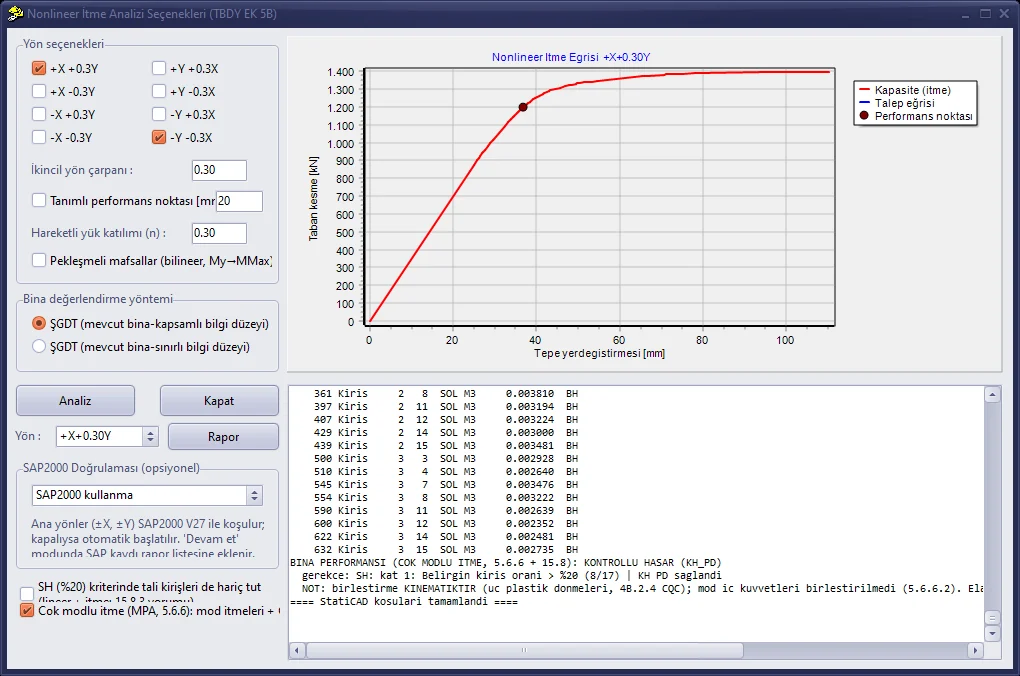
Nonlinear pushover analysis: pushover curve, performance point and the building performance verdict of multi-mode pushover
The seismic safety of an existing reinforced concrete building is measured not by the force-based approach used in new building design, but by how much the members will deform under earthquake and whether these deformations stay within safe limits. TBDY 2018 Chapter 15 defines this assessment: the knowledge level is determined from the information collected on the building, the seismic demand is calculated, the damage region is found for every column, beam and shear wall, and a building performance level verdict is given as Limited Damage, Controlled Damage or Collapse Prevention.
The linear method provides a quick and sufficient assessment for many buildings, but it does not show in which order and by how much members yield. In the deformation-based assessment and design (ŞGDT) approach, nonlinear pushover analysis tracks the formation of plastic hinges step by step; at the seismic demand, the plastic rotation of each hinge is compared with the damage limits of the code.
StatiCAD runs this entire chain automatically on the same project: material models, section analysis, pushover curve, seismic demand, damage tables and the building verdict. The result is a calculation report that states the rationale of the verdict clearly and is ready for review.
All steps of existing RC building assessment, from linear assessment to multi-mode pushover.
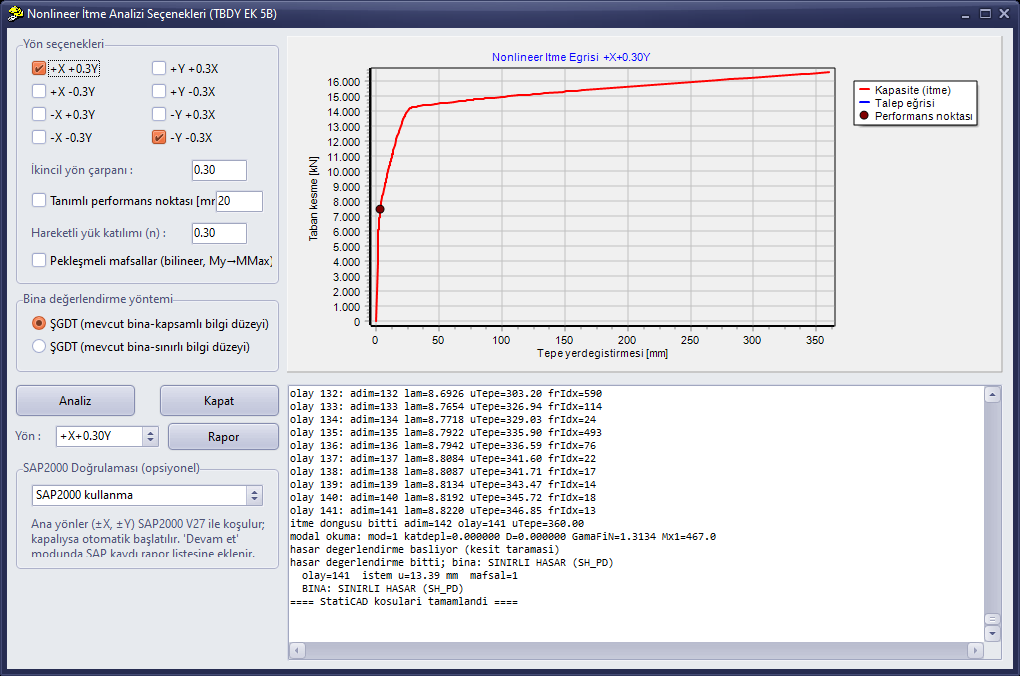
Nonlinear pushover analysis window: direction combinations, pushover curve, performance point and building performance level
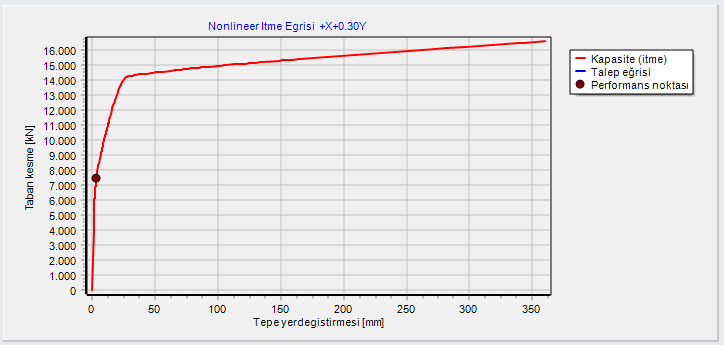
Pushover curve and performance point (base shear force – roof displacement)
Step-by-step guide: How to Perform a Nonlinear Pushover Analysis (Knowledge Base)
A detailed report for each direction combination, which can be previewed and saved as PDF:
The StatiCAD pushover engine has been verified with automatic model-to-model comparisons against SAP2000 V27. At the demand point where the engineering verdict is made, the two programs produce the same roof displacement and matching damage tables; the building verdict is identical in seven of the eight direction combinations. The only difference is a borderline case where the demand coincides exactly with the yield limit.
Curve peak-to-base-shear ratios are in the 0.89–0.93 band for unidirectional pushovers, and StatiCAD is consistently on the safe side. The same comparisons can be reproduced in every project with the “Verify with SAP2000” option.
Existing reinforced concrete buildings are assessed per TBDY 2018 Chapter 15. In deformation-based assessment, Chapter 5 with Annex 5A (material models) and Annex 5B (seismic demand) is applied; the building performance level verdict is given with the rules in 15.8.
TBDY 2018 allows both routes; the choice depends on the characteristics of the building and the engineer’s judgment. In StatiCAD, on the same model you can run the linear assessment first, then the nonlinear pushover analysis, and compare the results.
If the mass participation of the dominant mode is below 70%, or the torsional irregularity coefficient ηbi exceeds 1.4, this is clearly flagged in the report. For these buildings, assessment can be made per TBDY 5.6.6 with multi-mode pushover or the IRSA method.
No. All analyses and reports are performed with StatiCAD’s own solver. If SAP2000 V27 is installed and licensed on your computer, additional options are available to compare results with an independent solver or to continue the calculation with the SAP2000 solution.
Yes. Retrofitting is defined on members in the same project file and included in the calculation with a single option; results before and after retrofitting are compared in the report. See the RC Retrofitting page for details.
The RC performance analysis and retrofitting module is included in the Ultimate, Profesyonel and Betonarme editions. With the free demo version you can try the workflow on your own project.
Download the demo version and try linear assessment and pushover analysis on your own project for free, or let us determine the right edition for you together.